Google Tag Manager, is that something for you?
Are you getting the most out of your website, social media, and online marketing? Probably not, as for many companies the cause is that the analytics and optimization system is a mess. When you connect multiple tools and platforms to your website, it’s easy to lose sight of the big picture. Google noticed this too and developed Google Tag Manager. A dull name but a product that can save you a lot of time and effort. We explain what it is and whether it can benefit you.
A website is to marketing what the trunk is to a tree; the foundation of your online marketing. For e-commerce companies, this may be obvious, but it applies just as much to B2B companies. In this era of mobile internet and social media, almost all marketing and communication of a company should ideally lead back to the website. There you can map visitors, engage them, and ultimately sell something: convert.
 To map and track visitors, today’s marketer can use a whole range of different tools. Common examples are Google Analytics, Facebook Advertising, Google AdWords, and LinkedIn Insights. These tools only work really well if they can link your visitors to their own information.
Tracking and ‘tagging’ visitors
To link your visitors to the accounts they have on, for example, Facebook, you need to place a so-called tag on your website. That tag is a piece of code that silently loads Facebook and tells it who the visitor is and what they do on your website. In the case of Facebook, you can then advertise specifically targeted at that visitor.
Another example you undoubtedly recognize is Retargeting. After visiting, for example, Cool Blue where you searched for vacuum cleaners, you suddenly see vacuum cleaner ads everywhere. Cool Blue has ‘tagged’ you and uses a platform like Google Adwords to still entice you to make a purchase.
Do these companies immediately have all my information? No, in practice this data is always anonymized, although it’s scary how much you can learn from anonymous data. But that’s another discussion.
What is Google Tag Manager?
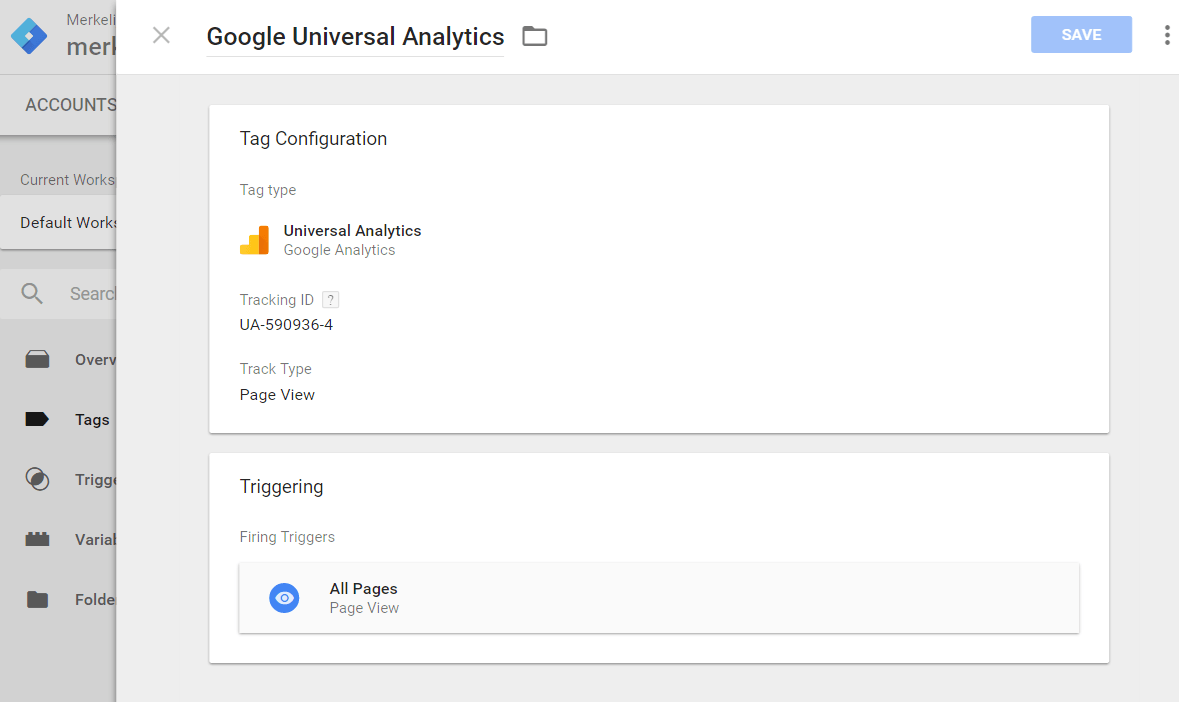
Once set up, adding something like Google Analytics is just minutes of work.
It’s in the name: Google Tag Manager is a platform that manages your various tags. You only place the Google Tag Manager Tag on your site and then specify which information it should share with which platform. This makes it very easy to add code, for example, when a new social platform emerges where you want to advertise.
But it goes further: instead of placing the same tag on every page, you can also link tags to individual pages or even to certain clicks! These are the so-called triggers. It probably sounds very micro, so we give some examples of what you can actually use this for in practice.
Three benefits of Google Tag Manager
- Optimizing your website
By means of triggers and tags, you can determine which page performs best. Maybe a different photo on that product page results in many more sales; with tags, you can find out. - Tracking and increasing advertising results
If someone clicks on your ad or advertorial, what happens then? Sometimes that person leaves quickly, not because the offer isn’t interesting but, for example, because the kitchen timer goes off. It’s a shame if you lose that person forever now. With tags, you can bring your offer to their attention again. - The same foundation for every platform
Setting up, for example, conversion goals, tracking, and retargeting is a lot of work. By using one central platform, you ensure that you use the same factors on every platform. This makes reporting easier and gives you better insight into the variables.
Using Google Tag Manager in B2B or B2C?
The answer is yes in both cases!
Implementation takes some time; after all, it’s a new platform, but after a while, you’ll have it mastered. Adding a new tag is then child’s play, so you lose very little time and can still use the latest analytics and marketing tools.
A common argument from B2B marketers against online marketing is that it’s ‘too broad’ and you don’t know if you’re reaching the right target audience. With this, you can accurately determine whether your marketing and communication are reaching the right audience and steer much more on results. Especially the latter can help enormously in a B2B environment to convince the rest of the company to invest in ‘alternative’ marketing methods.
In B2C, it’s a no-brainer. You want to track your target audience across various social media and websites; this is the most practical and efficient way to do that.
At tagmanager.google.com you open an account. If you get stuck, we are of course happy to help you get started.